
Change Management
1. Definition:
ServiceNow change management is a module that provides a structured approach to managing changes within an IT environment, ensuring they are implemented safely and efficiently while minimizing disruptions.
1.1Types of Changes
1.1.1 Standard Change
- Pre-approved, low-risk, and common (e.g., password reset, software update).
- No CAB (Change Advisory Board) approval is required.
1.1.2 Normal Change
- Requires risk assessment and CAB approval. (within 24 Hours)
- Goes through various stages: creation, assessment, approval, implementation, review.
1.1.3Emergency Change
- For urgent repairs (e.g., production outage).
- Requires expedited approval process.
2. Normal Change Management (Flow)
States in any ServiceNow application serve a specific purpose. They are designed to make it clear where in a process a record currently resides and to display progress. States should represent a unique phase in a process where a specific set of related activities are grouped together designed to achieve a particular outcome to move to the next phase of the process.
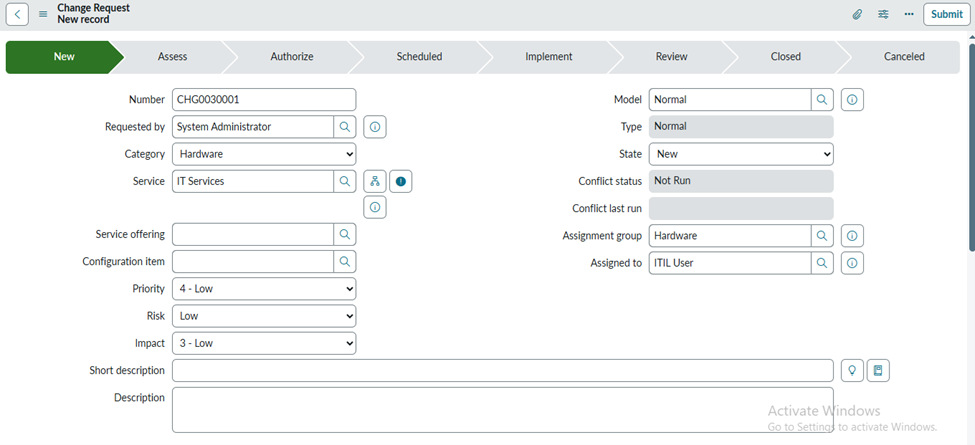
2.1 New
- When a Change Request is first created in ServiceNow, it enters the New state, which represents the very beginning of the change of lifecycle. At this stage, the change has only been submitted with basic details, and no evaluation, approvals, or workflow activities have started yet.
- The New state acts like a draft phase where the Change Manager or Change Coordinator reviews the initial information to verify whether the request is valid, complete, and ready for further processing. Only after this review does the Change move out of the New state—usually into the Assess or Authorize stage—where detailed analysis, risk and impact assessment, and approval workflows begin.
2.2 Assess
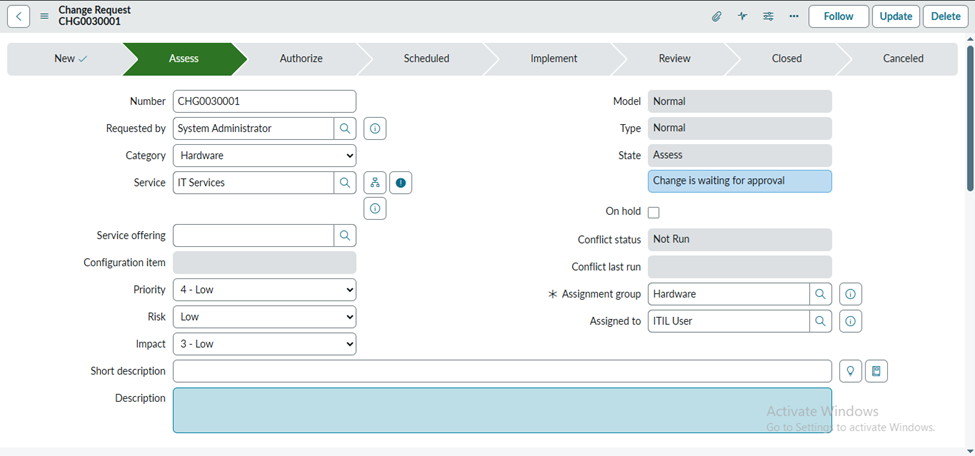
- In the Assessed state of a Change Request, all the necessary analysis—such as impact, risk, complexity, and resource requirements—has already been completed by the technical and change teams. Once this evaluation is done, the Change Request moves into a stage where it needs authorization before it can proceed further.
- At this point, the Service Owner plays a key role by reviewing the assessment details and deciding whether the change should move forward.
The Service Owner approves the change in the Assessed state, ensuring that the proposed modification is beneficial, aligns with service goals, and does not pose unacceptable risks. This approval is crucial because it confirms that the change is justified, planned properly, and safe to advance toward scheduling and implementation
2.3 Authorize
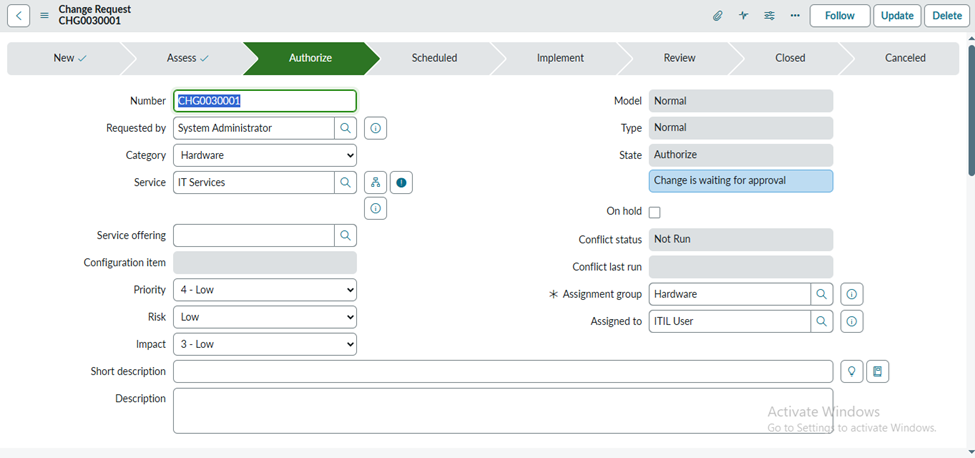
- In Change Management, the Authorized state is the stage where all required approvals—especially from the Change Advisory Board (CAB)—are handled for Normal changes.
- When a Normal change reaches this state, it automatically triggers the CAB approval workflow, ensuring that the proposed change has been reviewed from technical, business, and risk perspectives. The Authorized state is also the point where the change start and end dates are finalized and confirmed.
- By the time a change is authorized, all assessments are complete, stakeholders have approved it, and the schedule is locked in so the change can proceed confidently toward implementation.
2.4 Scheduled
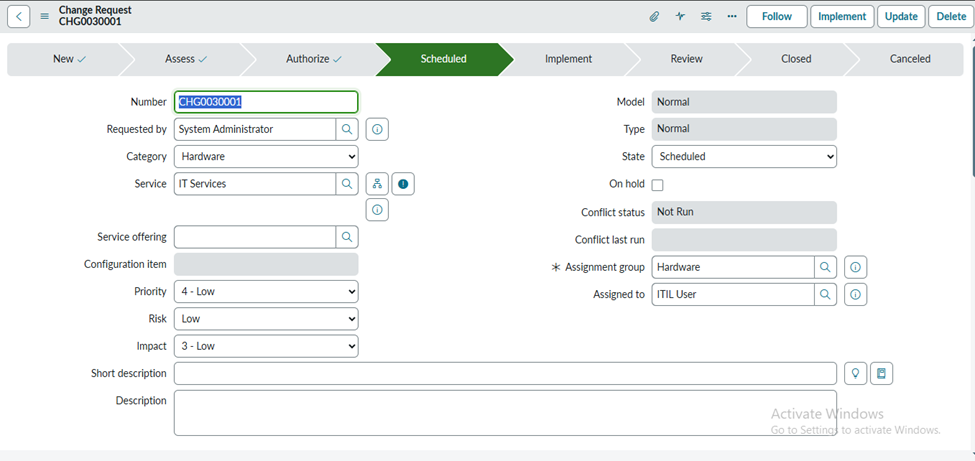
- In the Scheduled state of a Change Request, all approvals have already been completed, and the change is fully authorized for implementation.
- At this stage, no further activities or reviews take place because everything required for execution—such as risk assessment, planning, approvals, and scheduling—has already been finalized.
- The change simply remains in the Scheduled state until the Planned Start Date arrives. Once that date and time are reached, the change will move forward into the Implementation phase, where the actual work begins.
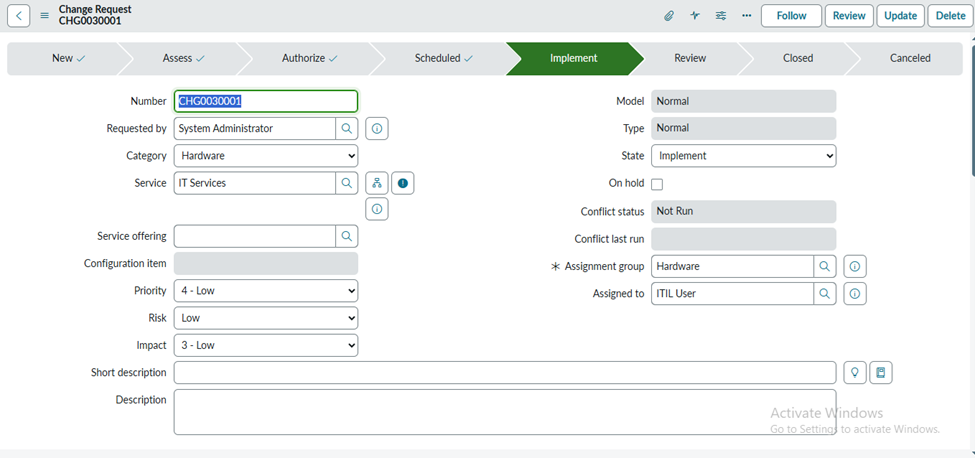
2.5 Implement
- When a Change Request moves into the Implement state, the system automatically populates the Actual Start Date field with the exact date and time the implementation begins.
- This marks the official start of the execution phase. During this state, all work related to the change is carried out, and the Work Notes field or associated Change Tasks are used to record every activity performed as part of the implementation.
- These notes help maintain complete transparency, provide technical documentation, and ensure accurate tracking of progress throughout the implementation process.
2.6 Review
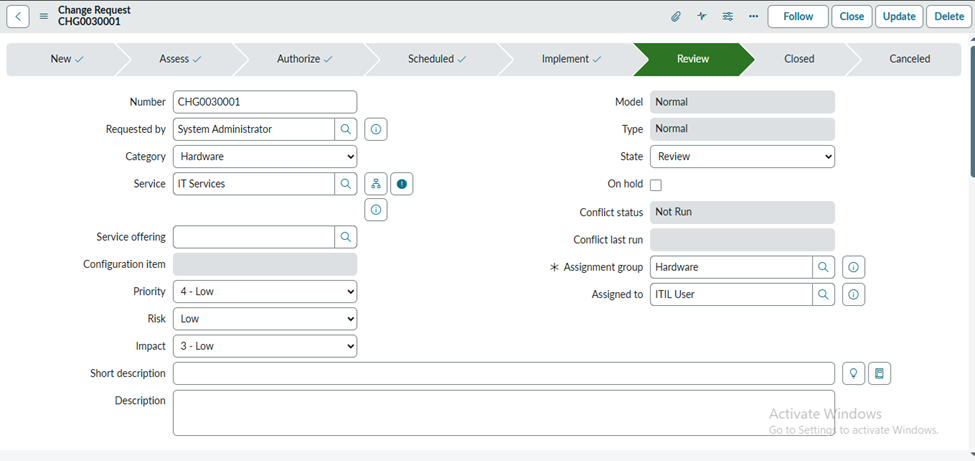
- When a Change Request moves into the Review state, the system automatically fills in the Actual End Date with the exact date and time the implementation work is completed.
- This marks the official end of the execution phase. The Review state is used to verify whether the change was successful, evaluate any issues encountered, and confirm that all implementation tasks were completed as planned.
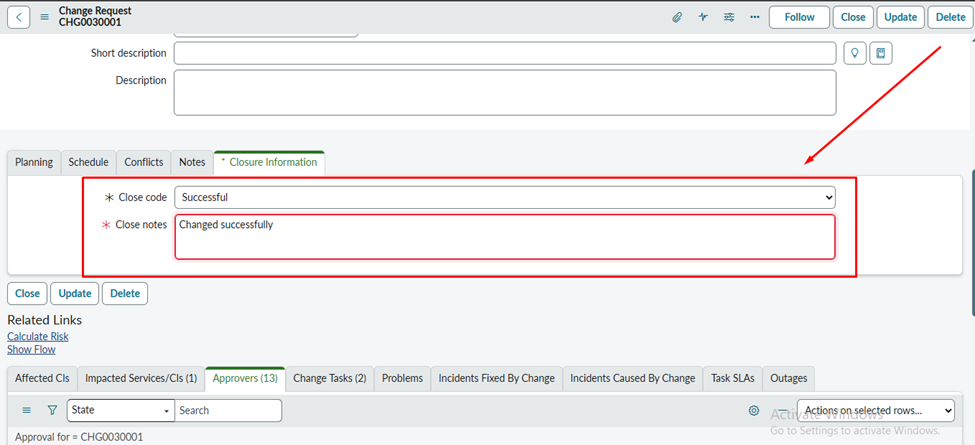
The Implementer will populate the mandatory fields:
2.8 Closed
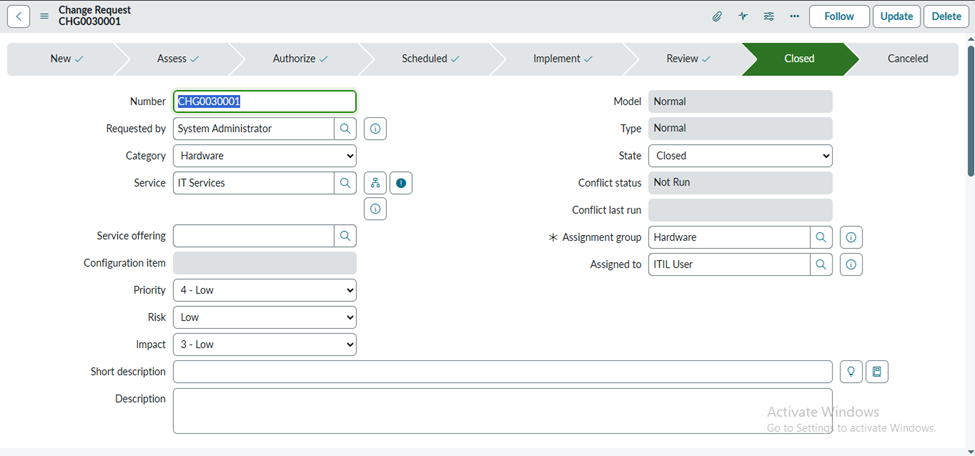
- The Closed state represents the final completion of a Change Request (CR). It indicates that all stages of the change—planning, approvals, implementation, and review—have been fully completed and documented.
- Once a change reaches the Closed state, no further actions are required, and the record is effectively archived for future reference, reporting, or audit purposes.
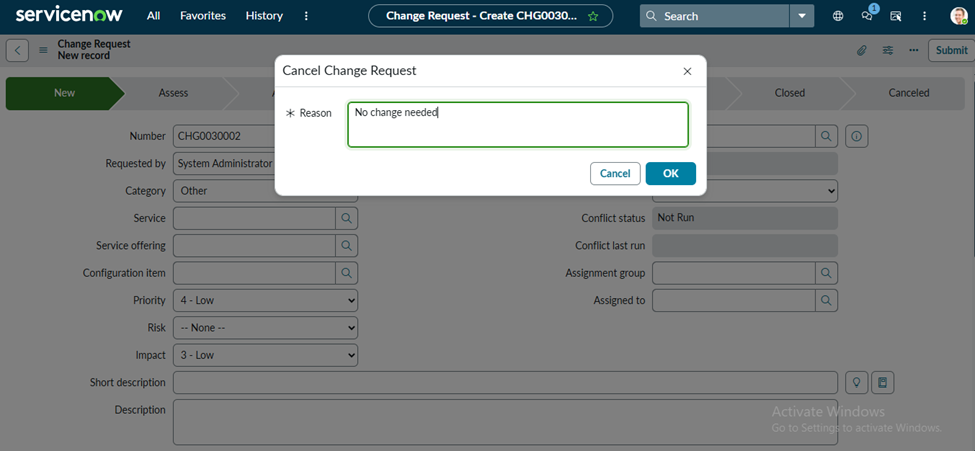
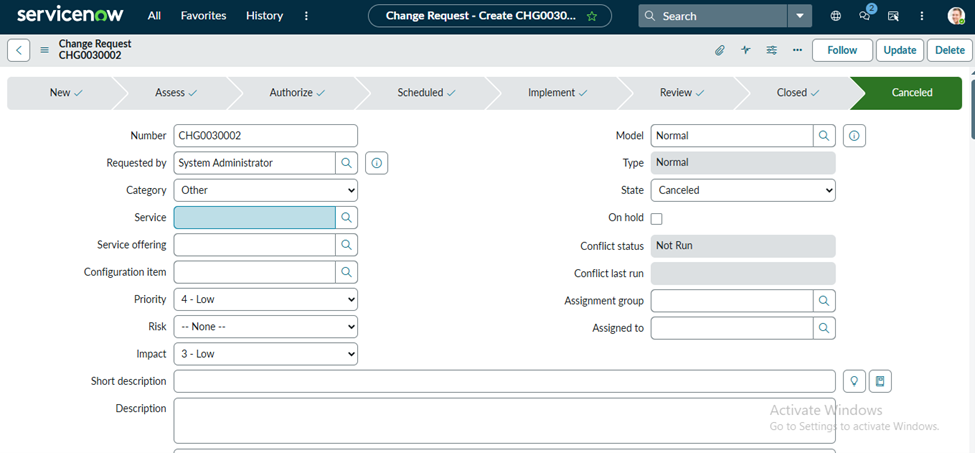
2.9 Canceled
- The Canceled state represents a Change Request (CR) that is no longer required, deemed invalid, or should not continue through the change lifecycle.
- When a change is canceled, it means that it will not move forward to assessment, approval, implementation, or any further stage.
- The request is officially stopped and closed out of the active change process, typically because the need no longer exists, requirements have changed, or the change was created in error.
3 Emergency Change Management (Flow)
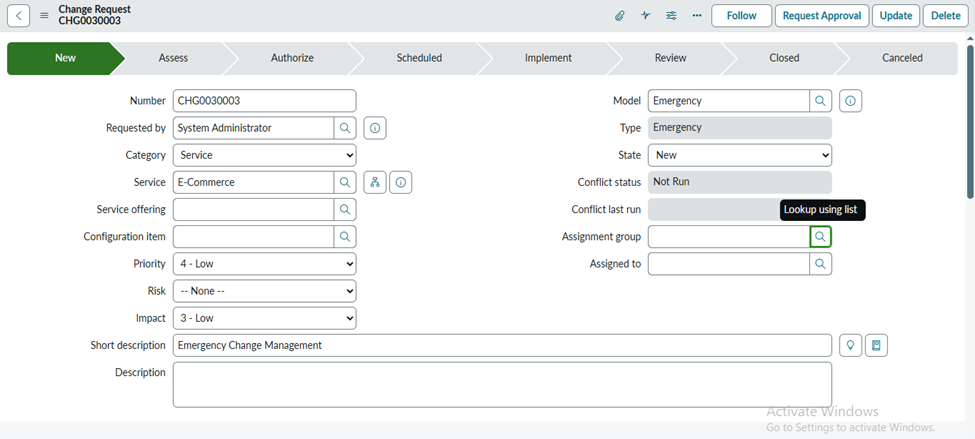
3.1 New
- In Emergency Change Management, when a change is first created, it begins in the New state, just like other change types. However, this stage is extremely brief because emergency changes are time-critical and require immediate attention.
- The New state simply captures the initial details of the urgent issue—such as the impact, affected services, and the reason for emergency treatment—before the change is quickly reviewed by the Change Manager or Emergency CAB (ECAB).
- Unlike normal changes, the New state in an emergency scenario is not used for extended analysis or planning; instead, it acts as a rapid starting point from which the change moves almost immediately into authorization and implementation to restore service as quickly as possible.
3.2 Authorize
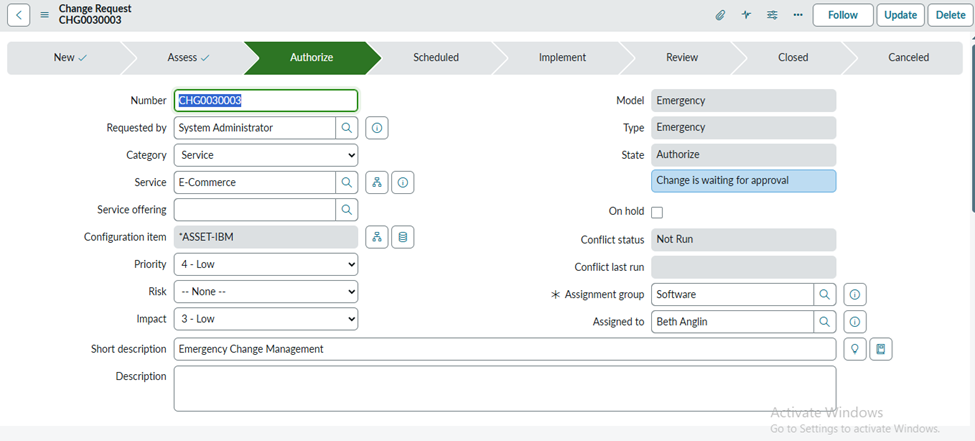
- In Emergency Change Management, the Authorized state is still used to handle approvals, but the process is significantly faster due to the urgent nature of the change.
- While Normal changes require full CAB approval, emergency changes are typically reviewed and authorized by the Emergency CAB (ECAB) or a designated authority who can make rapid decisions. In this state, the emergency change is quickly validated, approved, and prepared for immediate execution.
- The Authorized state also confirms the scheduled start time—often set to begin as soon as possible—to ensure that the emergency fix can proceed without delay, minimizing service disruption and restoring normal operations swiftly.
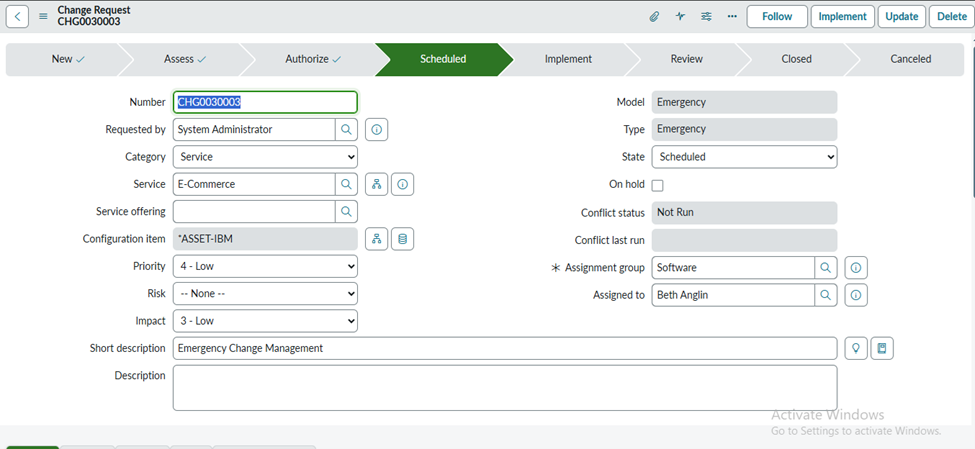
3.3 Scheduled
- In Emergency Change Management, the Scheduled state still indicates that the change has been fully approved for implementation, but this phase is extremely short or sometimes bypassed altogether due to the urgent nature of the work.
- Since emergency changes are meant to be executed immediately to restore service or prevent major impact, the Scheduled state simply reflects that the change is ready to proceed and is only waiting for the planned start time—which, in most emergency cases, is set to begin right away.
- No additional activities occur in this state; it merely serves as a brief holding point before the change quickly moves into implementation.
3.4 Implement
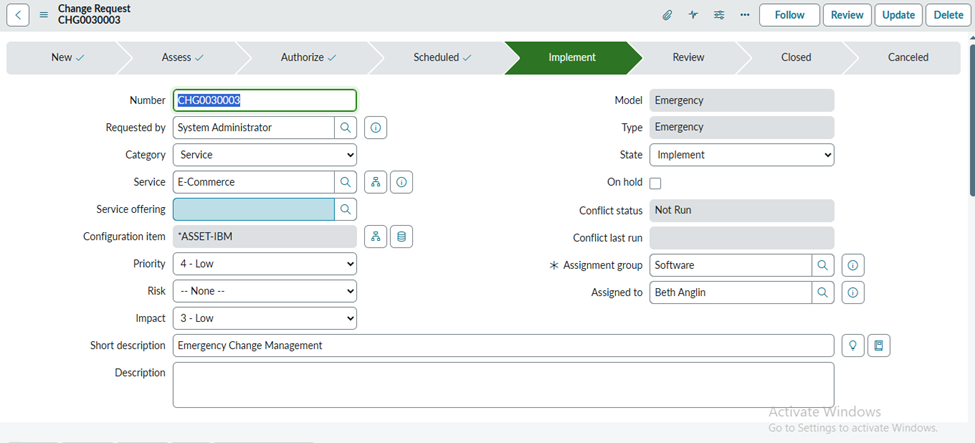
- In Emergency Change Management, when the change moves into the Implement state, the system automatically fills the Actual Start Date with the exact date and time the urgent work begins.
- This marks the start of the high-priority implementation phase, where teams work quickly to restore service or prevent further impact. During this state, all technical actions, troubleshooting steps, and updates must be recorded in the Work Notes or captured through Change Tasks.
- These entries provide essential documentation of what was done, who performed it, and how the issue was addressed, ensuring clear tracking and accountability even in a fast-paced emergency scenario.
3.5 Review
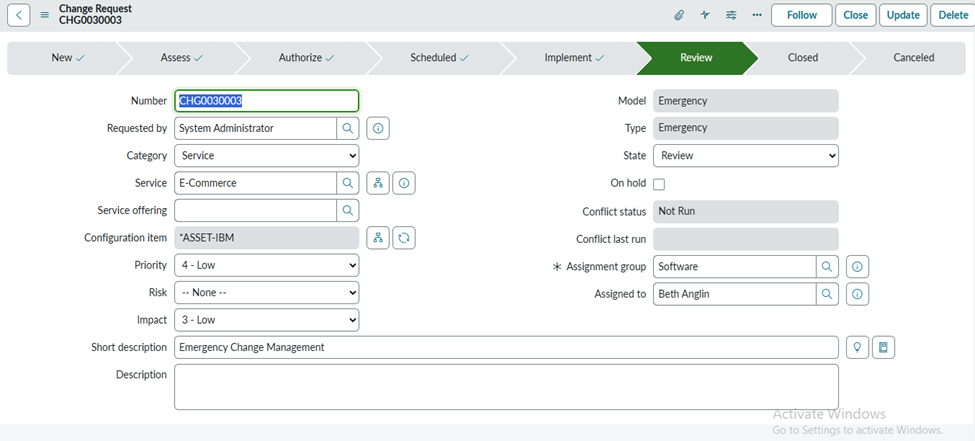
- In Emergency Change Management, when the change moves into the Review state, the system automatically populates the Actual End Date with the exact date and time the emergency implementation was completed.
- This signals that the urgent work has finished, and the service has been restored or stabilized. In this state, the Implementer must fill in all mandatory fields to provide a complete record of what was done.
- These typically include details such as the implementation summary, resolution notes, backout information (if applicable), and any lessons learned. This documentation is crucial because it ensures that even though the change was executed rapidly, a clear and accurate record exists for audit, analysis, and future prevention.
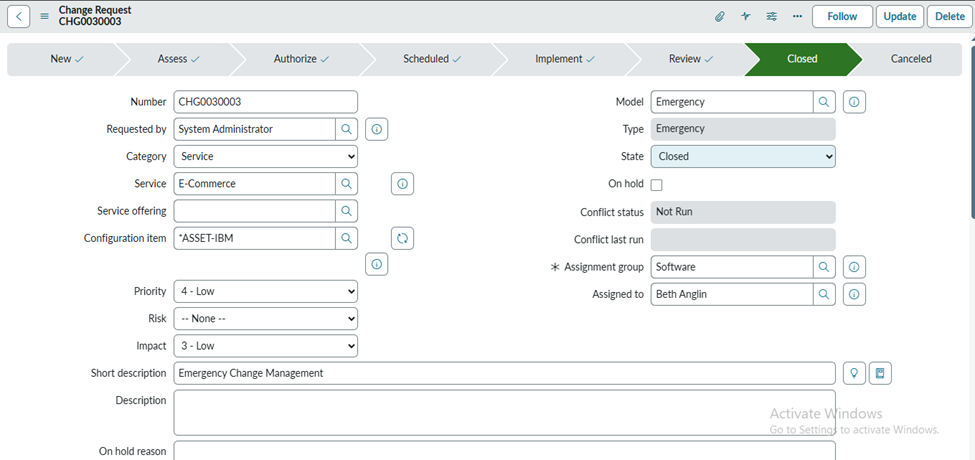
3.6 Close
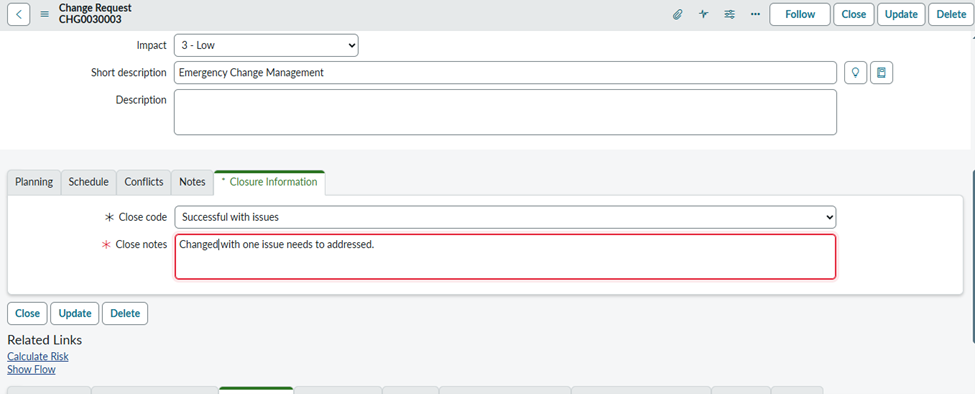
- In Emergency Change Management, the Closed state represents the final completion of the Change Request (CR) after all urgent activities have been fully carried out and properly documented.
- Even though an emergency change moves through the lifecycle much faster, once it reaches the Closed state, it means every step—authorization, rapid implementation, and post-implementation review—has been completed.
- All required fields, work notes, and outcomes have been recorded to ensure traceability and compliance. At this point, the change is officially closed and archived, serving as a reference for future analysis, audits, and continuous improvement of emergency handling processes.
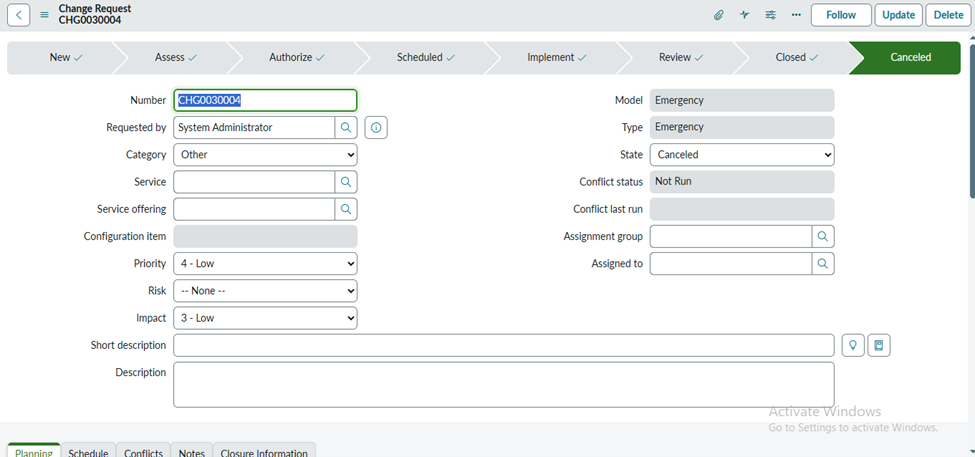
3.7 Canceled
- In Emergency Change Management, the Canceled state represents a Change Request (CR) that is no longer needed, considered invalid, or should not proceed through the change lifecycle.
- Even though emergency changes are time-sensitive, there may be situations—such as the underlying issue being resolved by other means or the emergency being a false alarm—where the change is stopped.
- Moving the change to the Canceled state officially terminates it, ensuring that no further actions, approvals, or implementations are performed, while maintaining a record for audit and tracking purposes.
4.Standard Change Management (Flow)
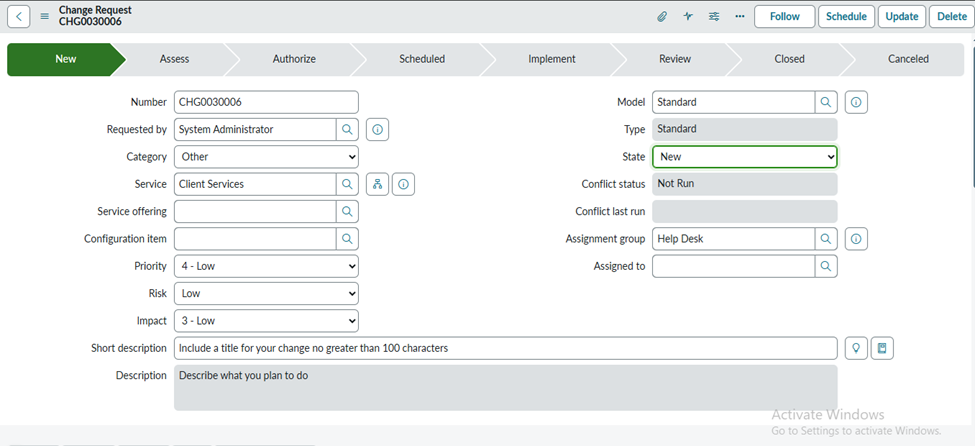
4.1 New
- In Standard Change Management, when a change is first created, it enters the New state, which serves as the initial stage of the change lifecycle. At this point, the change has been submitted with only the basic details, such as the description, category, and requester information.
- No assessment, approvals, or implementation planning occurs in the New state. It essentially acts as a placeholder to capture the change request and allows the Change Manager or designated authority to review the submission, verify its validity, and determine whether it should proceed further in the standard change workflow.
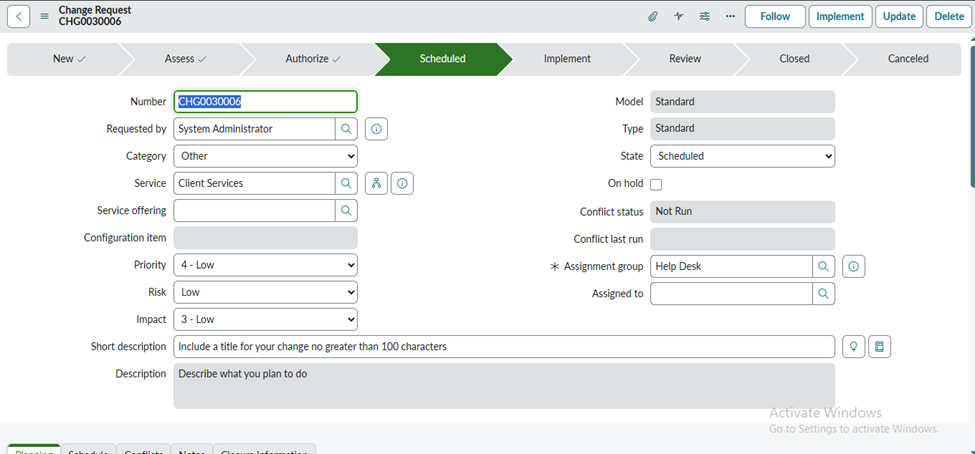
4.2 Scheduled
- In Standard Change Management, the Scheduled state indicates that the change has been fully approved, and all planning activities are complete.
- No further actions or evaluations take place in this state; the change simply waits until the Planned Start Date arrives.
- Once that date and time are reached, the change moves into the Implement state, where the actual work is carried out according to the approved schedule.
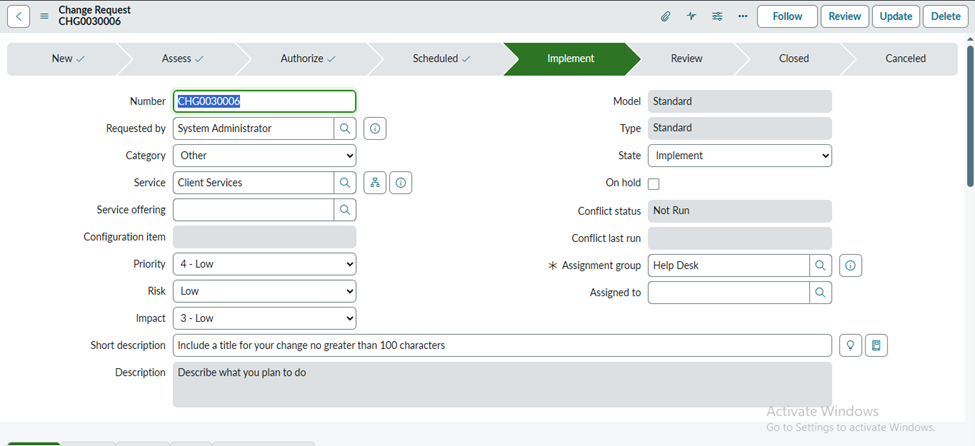
4.3 Implement
- In Standard Change Management, when a change moves into the Implement state, the system automatically populates the Actual Start Date with the exact date and time the implementation begins.
- This marks the official start of executing the approved change. During this phase, all activities performed as part of the implementation—such as configuration updates, system modifications, or testing—are documented in the Work Notes field or through associated Change Tasks.
- This ensures a complete record of what was done, who performed it, and when providing transparency and accountability throughout the implementation process.
4.4 Resolve
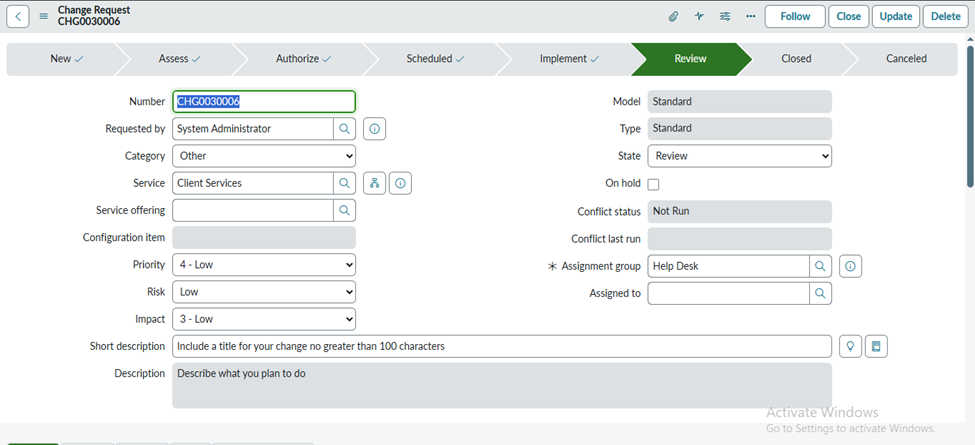
- In Standard Change Management, when a change moves into the Review (or Resolve) state, the system automatically populates the Actual End Date with the exact date and time the implementation work is completed.
- This state is used to verify whether the change objectives were successfully met, confirm that all tasks were completed as planned, and document any issues or outcomes.
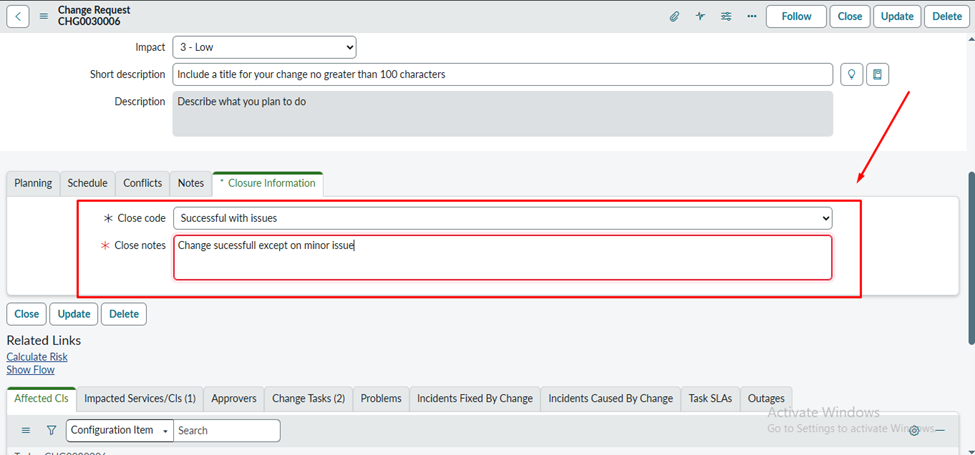
- The implementer or change owner is responsible for filling in all mandatory fields, such as the implementation summary, resolution notes, and any backout information if applicable. This ensures that a complete and accurate record is maintained before the change moves to the Closed state.
4.5 Close
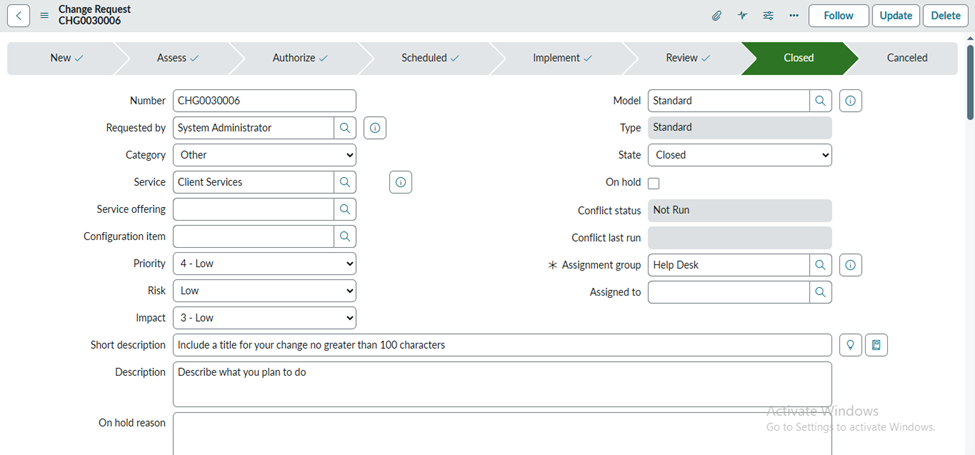
- In Standard Change Management, the Closed state represents the final completion of a Change Request (CR). It indicates that all stages of the change—planning, approvals, implementation, and review—have been fully executed and properly documented.
- Once a change reaches the Closed state, no further actions are required, and the record is officially archived.
- This ensures a complete audit trail, provides historical reference for reporting, and confirms that the change has been successfully completed according to the defined process.
4.6 Canceled
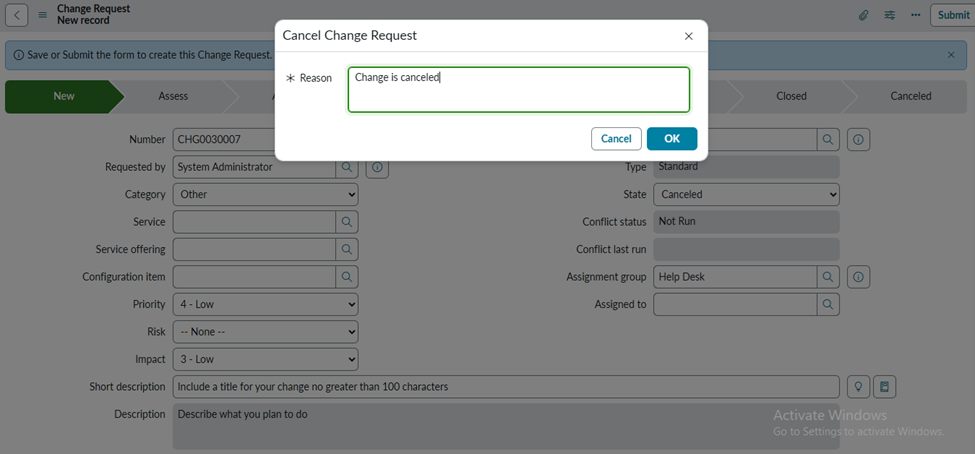
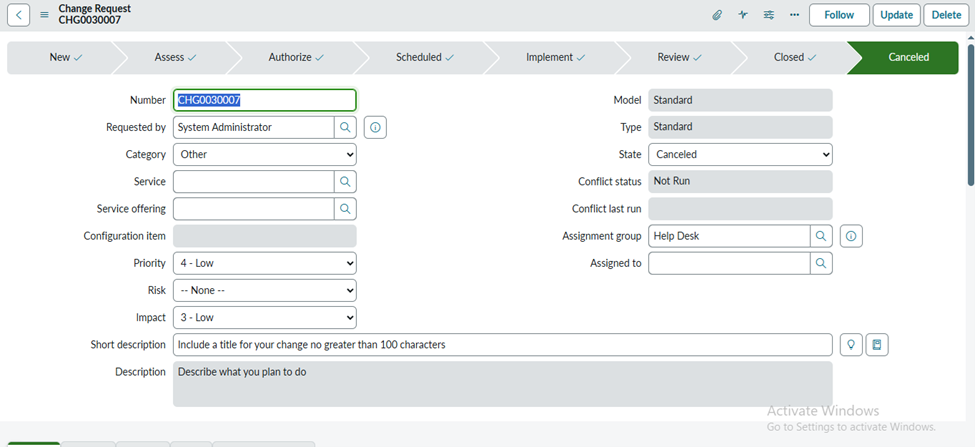
In Standard Change Management, the Canceled state represents a Change Request (CR) that is no longer required, considered invalid, or should not continue through the change lifecycle. When a change is moved to this state, all further actions, approvals, and implementations are stopped.
The record remains in the system for audit, tracking, and reporting purposes, ensuring that there is a documented reason for why the change was terminated without proceeding to completion.
5.Change Management – Fields Table
|
Field Name |
Technical Name |
Type |
Description |
|
Number |
number |
Auto-generated |
Unique identifier for each change request. |
|
State |
state |
Choice |
Current status of the change (New, Assess, Authorize, Scheduled, Implement, Review, Closed). |
|
Type |
type |
Choice |
Type of change (Standard, Normal, Emergency). |
|
Assignment Group |
assignment_group |
Reference |
The group is responsible for handling the change. |
|
Assigned To |
assigned_to |
Reference |
User assigned to work on the change. |
|
Requested By |
requested_by |
Reference |
User who requested the change. |
|
Category |
category |
Choice |
Category of the change (Hardware, Software, Network, etc.). |
|
Priority |
priority |
Choice |
Impact + Urgency determines priority. |
|
Impact |
impact |
Choice |
The level of impact the change has on business. |
|
Urgency |
urgency |
Choice |
How quickly is the change needed. |
|
Short Description |
short_description |
String |
A summary of the change. |
|
Description |
description |
Journal/HTML |
Detailed information about the change request. |
|
Change Plan |
chg_plan |
HTML |
Plan to implement the change. |
|
Test Plan |
test_plan |
HTML |
Details about testing the change implementation. |
|
Backout Plan |
backout_plan |
HTML |
Steps to revert if change fails. |
|
Risk |
risk |
Integer / choice |
Level of risk (Low, Medium, High). |
|
Justification |
justification |
HTML |
Reason for the change. |
|
Start Date |
start_date |
Date/Time |
When implementation is planned to start. |
|
End Date |
end_date |
Date/Time |
When implementation is completed. |
|
Planned Start Date |
planned_start_date |
Date/Time |
Planned start of change activities. |
|
Planned End Date |
planned_end_date |
Date/Time |
Planned end time of change activities. |
|
Implementation Plan |
implementation_plan |
HTML |
Step-by-step implementation details. |
|
CAB Required |
cab_required |
Boolean |
Indicates if CAB approval is needed. |
|
CAB Date |
cab_date |
Date/Time |
Scheduled CAB meeting date. |
|
Work Notes |
work_notes |
Journal |
Internal notes added by technicians. |
|
Additional Comments |
comments |
Journal |
Customer-visible comments. |
|
Approval |
approval |
Choice |
Approval status (Requested, Approved, Rejected). |
|
Approval History |
sysapproval_approval |
Related List |
Shows all approval records. |
|
Close Code |
close_code |
Choice |
Success, Failure, or Partial. |
|
Close Notes |
close_notes |
Journal |
Notes added while closing the change. |
|
Configuration Item (CI) |
cmdb_ci |
Reference |
The CI impacted or related to the change. |
|
Change Owner |
change_owner |
Reference |
The person responsible for the overall change. |
6.Conclusion
Change Management helps organizations make changes in a safe and organized way. It reduces risks, avoids unexpected issues, and ensures that every change is planned, approved, and implemented properly. By following a clear process, teams can keep systems stable while still improving and adapting to new needs.