Reference Qualifier in Service-now
1. Reference Qualifier :-
- It is used for filtering.
- They help refine the choices available in a reference field by defining conditions that the referenced records must meet.
- A reference qualifier is a filter applied to a reference field to restrict or refine the list of records that users can select from.
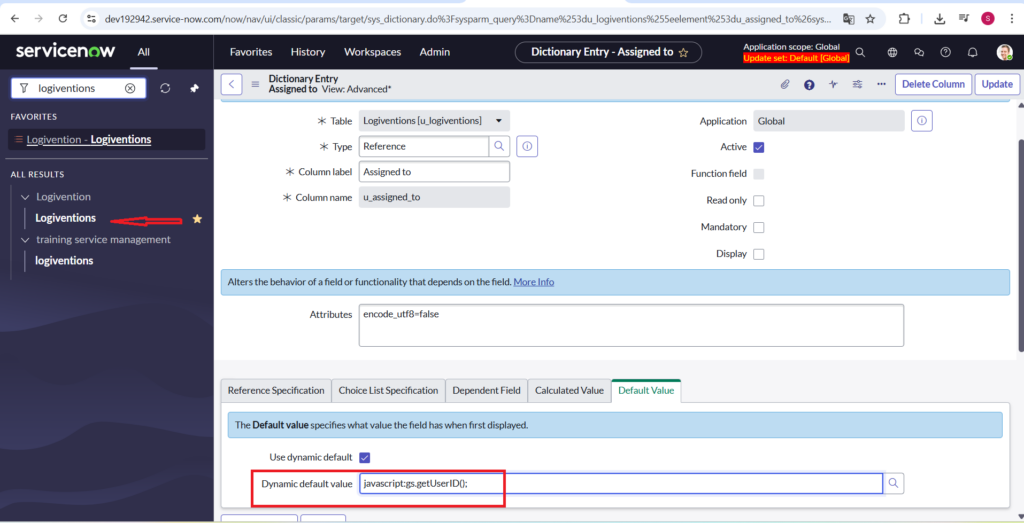
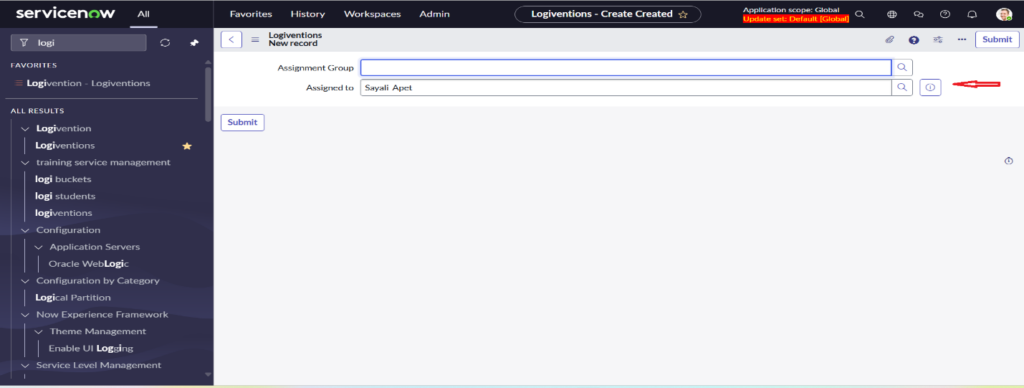
- If you want to set default value of reference field as current user
javascript:gs.getUserID();
Types of reference qualifier:-
1. Simple Reference Qualifier: –
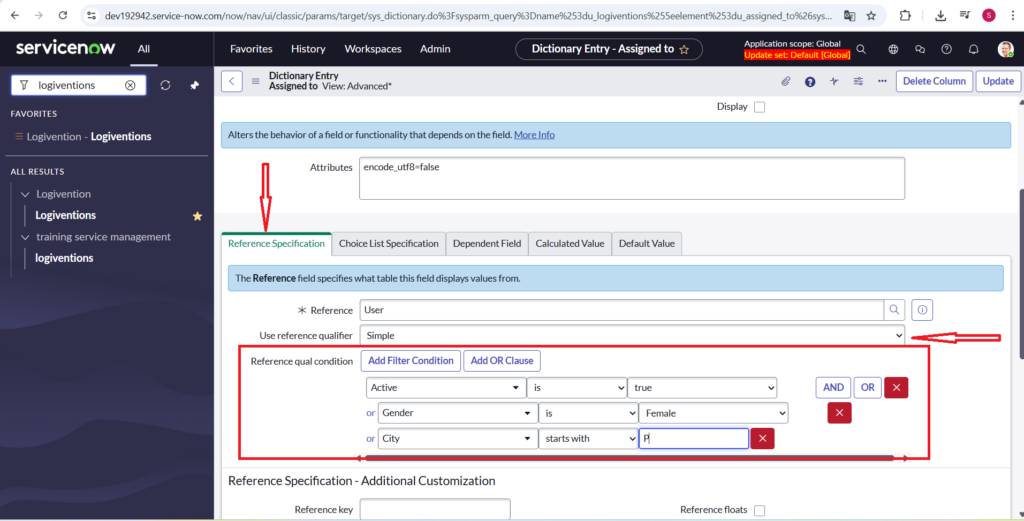
A simple reference qualifier in Service Now is often written as an encoded query string or a Glide Record query. It’s used to filter the choices available in a reference field based on specific criteria.Uses simple AND/OR conditions to filter records. For example, you can show only users where “Active” is “true”.
How to Reach Reference Qualifier in OOB Table or Custom Table:
Open any Table of Your Choice: – Incident/Problem/Change.
Step 1:-Application Navigator>Table>Open Existing Record or Create New.
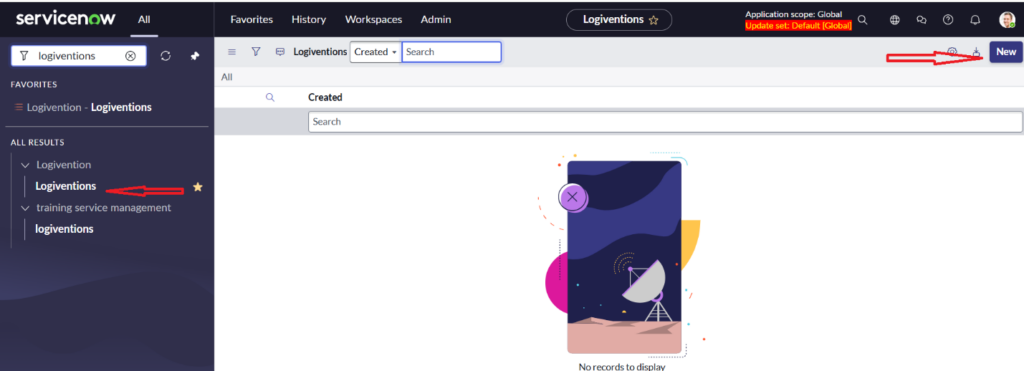
Step 2:- Right Click on Any Reference Field i.e. assigned to and Configure Dictionary
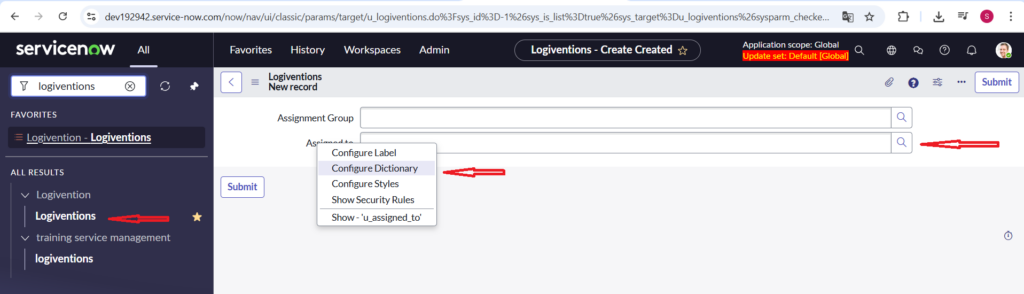
Step 3:- We are showing Reference Specification and applying Condition.
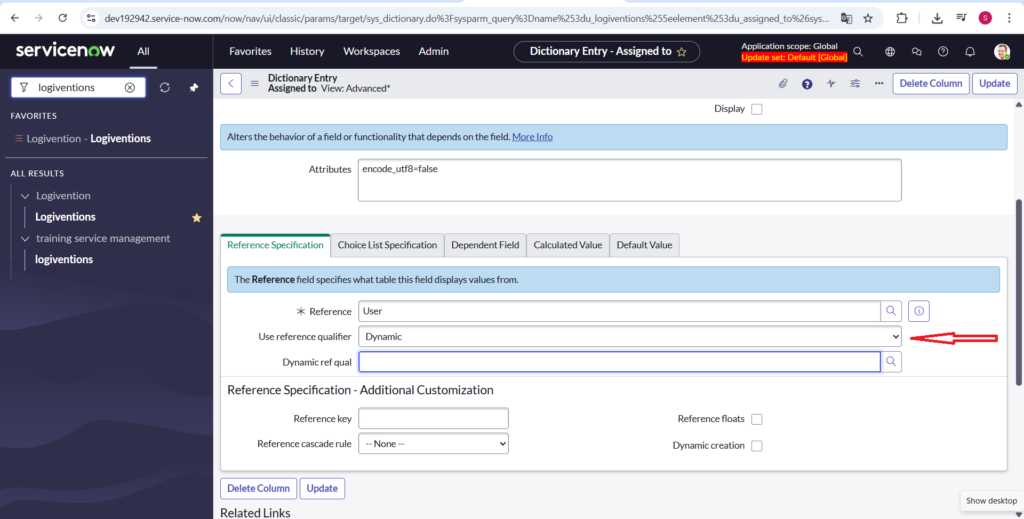
2. Dynamic Reference Qualifier: –
Dynamic reference qualifiers enable you to use a dynamic filter option to run a query against a reference field to filter the returned data set. Dynamic filter options are stored filters that can contain encoded query strings, JavaScript, or script includes, and can be used in multiple dynamic reference qualifiers. Changes made to a dynamic filter option automatically apply to all reference qualifiers that use the same dynamic filter option. Use this type of reference qualifier when you want to use the same filter on multiple forms or to provide filter functionality to “non-code savvy” implementers. The base instance provides several OOB dynamic filter options. If a dynamic filter option that meets your needs does not exist, you can create a new dynamic filter option that is specific to your requirements.All the available dynamic filters are stored in system definition>dynamic filter options.For creating the dynamic reference qualifier we must have a record in this dynamic filter options.After creating the dynamic reference qualifier you can add that filter from the Dynamic Ref qual field.
3.Advanced Reference Qualifier: –
Advanced reference qualifiers enable you to define an inline encrypted query string or JavaScript (actual code or the name of an existing script include or business rule) filter directly in the Reference qualified field of the reference qualifier. Similar to the other reference qualifier types, when the form loads, the filter is executed, and only the records that match the filter appear in the reference field. Use this type of reference qualifier for implementations that only require a simple, unique filter that cannot be handled by a simple reference qualifier, and is not used across multiple reference fields.
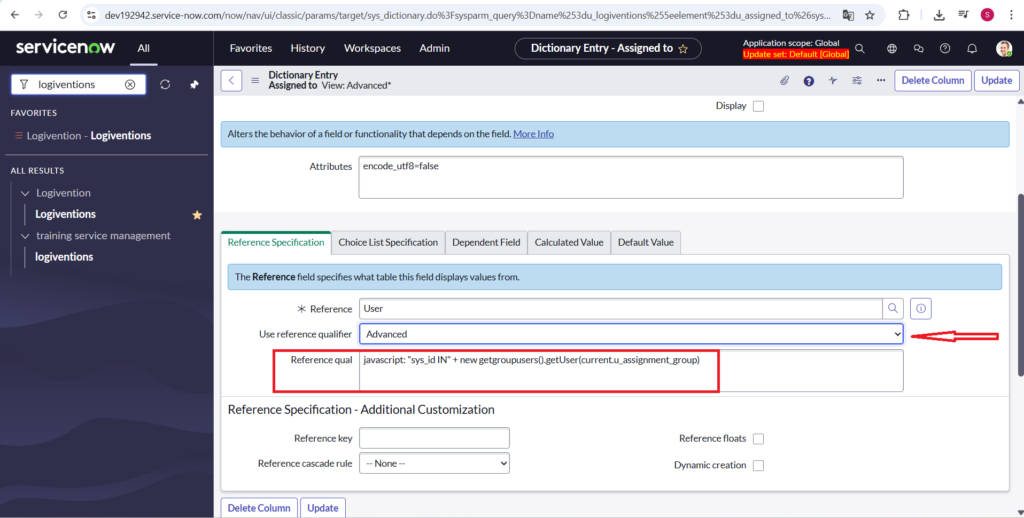
Here Is Explanation of the code
javascript: “sys_id IN” + new getgroupusers().getUser(current.u_assignment_group)
1.new getgroupusers().getUser(current.u_assignment_group)
- Calls the Script Include you created (getgroupusers).
- Passes the value of u_assignment_group (a group sys_id) to the function.
- The Script Include returns a comma-separated list of user sys_ids.
2. “sys_id IN” +
This constructs a valid encoded query.
Another way for doing Advanced reference qualifier is script include
Step 1:-Application Navigator>Script Include> Create New.
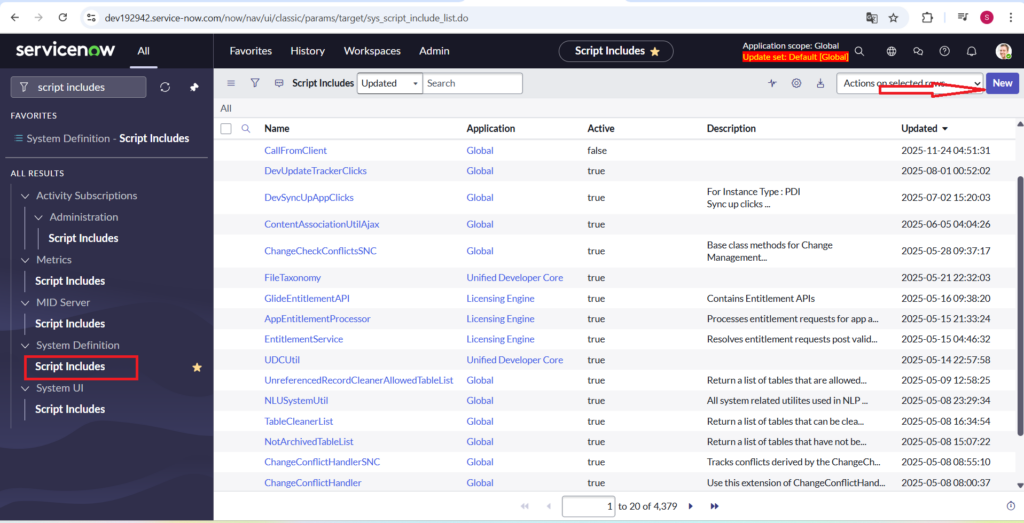
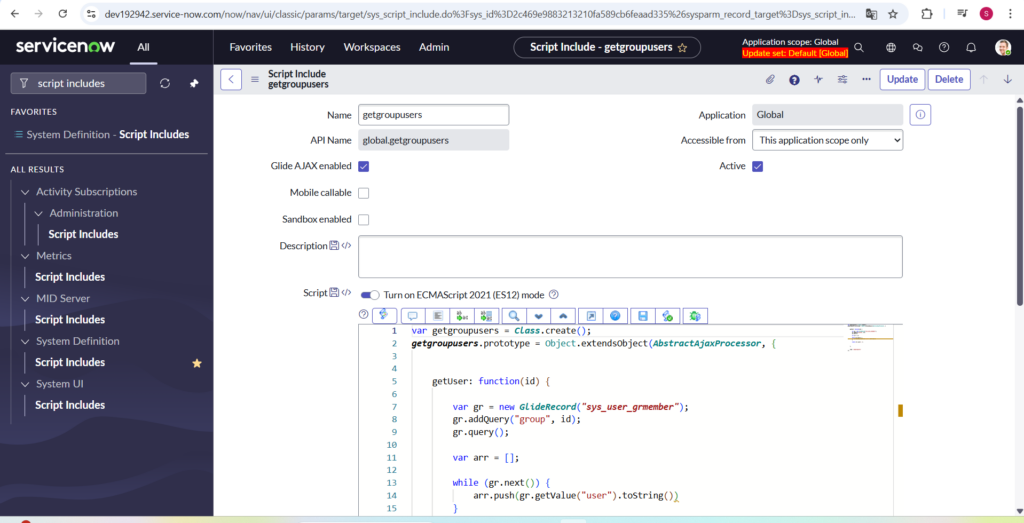
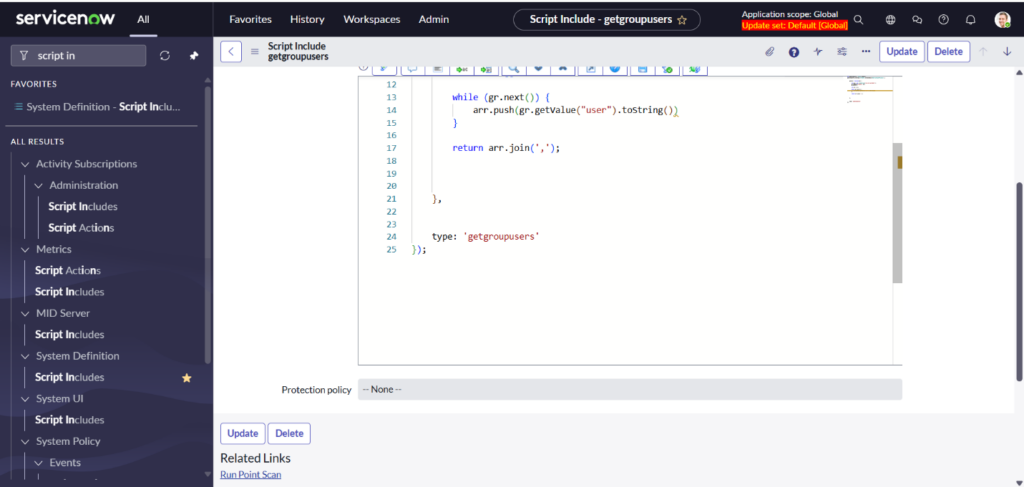
Step 2:- New<Name (getgroupusers)<Glide AJAX enabledScript
Lorem ipsum dolor sit amet, consectetur adipiscing elit. Ut elit tellus, luctus nec ullamcorper mattis, pulvinar dapibus leo.
Here Is The Code :-
var getgroupusers = Class.create();
getgroupusers.prototype = Object.extendsObject(AbstractAjaxProcessor, {
getUser: function(id) {
var gr = new GlideRecord(“sys_user_grmember”);
gr.addQuery(“group”, id);
gr.query();
var arr = [];
while (gr.next()) {
arr.push(gr.getValue(“user”).toString())
}
return arr.join(‘,’);
},
type: ‘getgroupusers’
});
Here Is the code Explanation in Detail :-
Script Include named getgroupusers that extends AbstractAjaxProcessor, meaning it can be called from a client script (AJAX call).
Function: getUser(id)
This function returns a comma-separated list of user sys_ids belonging to a given group sys_id.
Step-by-step breakdown
var getgroupusers = Class.create();getgroupusers.prototype = Object.extendsObject(AbstractAjaxProcessor, {
- Defines a Script Include.
- Inherits from AbstractAjaxProcessor → allows server-side methods to be called from client-side.
1. Query the sys_user_grmember table
var gr = new GlideRecord(“sys_user_grmember”);gr.addQuery(“group”, id);gr.query();
- Looks at the User Group Member
- Filters where group equals the passed id.
- Runs the query.
2. Build array of user sys_ids
var arr = []; while (gr.next()) { arr.push(gr.getValue(“user”).toString());}
- Loops over each record.
- Pushes the user field value (sys_id) into an array.
3. Return a comma-separated string
return arr.join(‘,’);
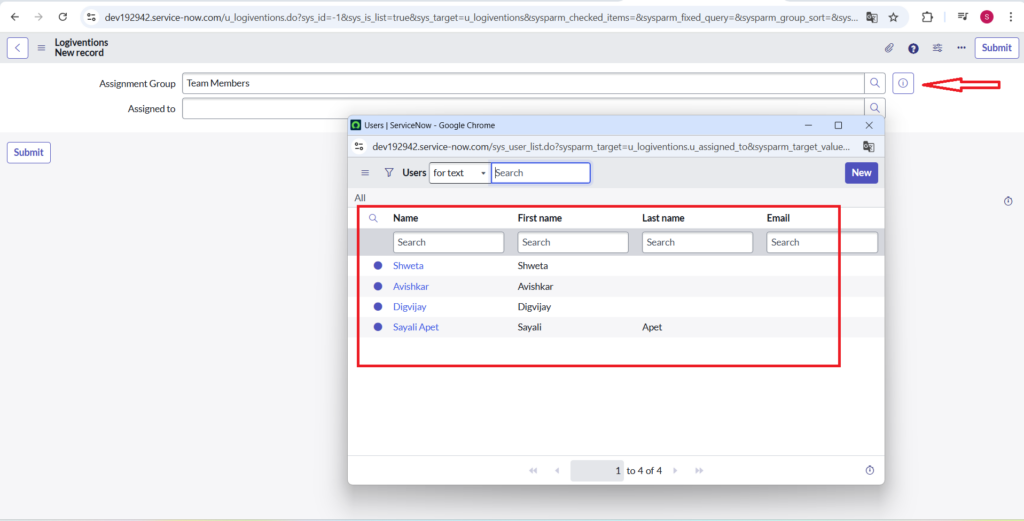
Here is the Output :-
Here, we get the group members in the Assigned To field from the group that we selected in the Assignment Group. This dynamic behavior ensures that the Assigned To field is populated only with valid group members, reducing manual errors and ensuring that work items are always assigned to users who actually belong to the selected group.